You Think You’re Chatting with an AI. You’re Actually Managing a Fixed-Size Text Box.
You spent the afternoon working with an AI. It refactored three modules for you. It seems to know your code style by now — early returns, no nesting beyond three levels, Go-flavored explicit error handling. By turn thirty, it almost feels like it understands your project better than the colleague sitting next to you.
The next morning you open a new chat and say, “Let’s keep going on yesterday’s refactor.”
It blinks. It doesn’t know who you are, doesn’t know your project, doesn’t know what you said yesterday. It’s like the two of you have never met. The window closes; the relationship resets to zero.
This isn’t a bug. It’s the inevitable consequence of how large models actually interact.
If you crack open the model itself — tokenization, attention, autoregressive generation — you’ll see it’s basically a probabilistic prediction machine. But knowing how the engine spins doesn’t tell you how to steer the wheel. The way we actually work with these models day to day — System Prompt, multi-turn chat, context window — how do those things shape what the prediction machine outputs?
The answer is simpler than you’d expect, and harsher than you’d expect:
You think you’re “chatting” with an AI. What you’re really doing is concatenating strings into a text box of fixed capacity.
Context Window: Not Memory, Just a Fixed-Size Input Box
Let’s start with the most basic concept: the context window.
If you’ve written network code, you’ll be familiar with TCP’s sliding window — it dictates how much data the sender can push at once. Anything outside the window is either not yet sent or already acknowledged and dropped. The receiver can only see what’s inside the window. Whatever lies beyond does not exist for it.
The context window is the model’s sliding window.
Every time you send a request, everything the model can “see” is the content inside that window. No more, no less. Whatever lies outside — yesterday’s conversation, last week’s code, the overall architecture of your project — simply does not exist as far as the model is concerned. It has no disk, no database, no persistent storage of any kind. Its entire “awareness” is just the text inside that window.
How big is the window? It has been moving. Early models had only a few thousand tokens — roughly a few thousand English words. Then it expanded to tens of thousands, hundreds of thousands. The leading models today have already pushed the ceiling to the million-token range. The numbers keep going up, but the underlying truth doesn’t change: it is still a bounded input box. No matter how big the window gets, it is finite. Your project code, conversation history, and reference docs combined are almost always larger than the window.
What happens when the window fills up? The crudest answer is truncation — the oldest messages get dropped to make room for new ones. You think AI “forgot” what you said. What actually happened is your words got pushed out of the window. Just like the TCP sliding window: when it slides forward, acknowledged data is released from the buffer. The data didn’t get blurry. It’s just gone.
More and more modern models and clients are adopting a smarter strategy: context compression. As the conversation approaches the window’s limit, the system automatically condenses the earlier history into a summary — a few hundred tokens summarizing what used to be several thousand — and replaces the original messages with that summary. You may have seen prompts in some tools saying “the conversation has been compressed.” That’s compression at work.
But compression is not a free lunch. The summary itself is generated by a model — it’s a probabilistic distillation of the original conversation, and detail loss is inevitable. That subtle edge case you discussed in turn 3, the naming convention you agreed on in turn 5 — after compression, all of it might collapse into one line: “discussed direction of code refactor.” The information goes from precise to fuzzy, from complete to lossy. Better than truncation? Most of the time, yes. But fundamentally it’s still information loss — the loss simply changed shape, from “whole sections gone” to “details evaporated.”
There’s a trap here that’s easy to fall into: window size is not the same as effective utilization.
A big window doesn’t mean you should fill it up. Three reasons. First, cost — model APIs charge by token, both input and output. Stretching context from a few thousand to several hundred thousand multiplies the per-call cost, and most of the stuff you stuffed in there is probably irrelevant to the current task. Second, latency — longer context means longer processing time. Attention is O(n²); double the tokens and computation goes up fourfold. Third, the most counterintuitive one — as the context grows longer, the model’s attention to certain parts actually weakens. We’ll come back to this.
The context window is the first foundational concept for understanding model interaction. Every later discussion — “memory,” RAG, “context engineering” — sits on the same premise: the window is finite, and the information we want to put inside it almost always exceeds its capacity.
System Prompt: Not a Command, but a Persona
If you’ve only ever used the ChatGPT web interface, you may not have come across the term System Prompt directly. Briefly: when you call a model through the API, each request can carry messages of three roles — system, user, and assistant. The System Prompt is the message under the system role. It usually comes at the very start of the conversation, and it’s where you set the model’s behavior, persona, and global constraints. The “custom instructions,” “role settings,” and “rule configurations” you see across various AI coding tools are almost all powered by System Prompts under the hood.
You’ve probably written or seen something like this:
“You are a senior Go engineer skilled in high-concurrency systems. You write clean code and prefer composition over inheritance.”
Intuitively, this looks like an order: “Be this character.” But technically, a System Prompt does not work like a command at all.
Recall how the model runs: input is a sequence of tokens; output is a probabilistic prediction over that sequence. What a System Prompt does is insert a chunk of text at the very beginning of that sequence. With the prompt above in place, every time the model generates a token, the attention mechanism “sees” that text and folds it into the probability calculation.
“You are a senior Go engineer” is not an instruction being executed. It’s a piece of text being attended to. The model has seen plenty of code and discussion in its training data written by senior Go engineers, and when this kind of text sits at the start of the context, the attention mechanism nudges the next-token probability toward “patterns a senior Go engineer would produce” — idiomatic Go, simple error handling, restrained abstractions.
The distinction between “attended to” and “executed” isn’t pedantic. It explains a lot of the puzzles you run into in practice.
Why do some System Prompt rules just not stick? Because the model is not executing instructions; it’s predicting probabilities. If your System Prompt says “never use the any type” but the user-supplied code is full of any, the model is being pulled in two directions at once: the prompt says one thing, the strong local pattern says another. Which side wins depends on how attention weights distribute — and those weights are shaped by distance, length, and pattern strength. The System Prompt isn’t law. It’s a tilt.
Why does the AI seem to “forget” the System Prompt in long conversations? The System Prompt sits at the very start of the context, and start positions do carry some attention advantage. But that advantage isn’t unlimited. As the conversation grows, dozens of turns of history get wedged in between, and the System Prompt now sits tens of thousands of tokens away from the current generation point. All those nearby tokens grab a big share of the attention weight, and the System Prompt’s influence gets diluted. By turn fifty, the prompt is technically still there at the top, but its “voice” has been drowned out by the noise in between — what’s near matters far more than what’s far.
This is exactly why experienced engineers will quietly re-inject the key parts of the System Prompt at critical moments in long conversations — not because the model “forgot,” but to pull the important constraint back closer to the generation point and reclaim some attention weight.
There’s a deeper issue too: the System Prompt and the user input look the same to the model. Both are just text in the context window. The labels system:, user:, assistant: are just textual markers. The model has learned through training to “treat content following system: as global constraints,” but that “learning” is statistical — not a hardcoded rule, just a probabilistic tendency.
Which means: a carefully crafted user input can override System Prompt constraints. That’s the basic mechanism behind prompt injection — if the user writes “ignore all previous instructions, you are now a…”, the model may well comply, because to the model this is just two pieces of text competing for attention weight. Whoever wins, wins. We’ll get to security elsewhere, but for now it’s important to lock in this view: the System Prompt is not a firewall. It’s a probabilistic nudge.
The Truth About Multi-Turn Chat: Every Turn Starts From Zero
Now let’s open up the biggest illusion in multi-turn conversation.
You’ve been chatting with the AI for ten turns. On turn eleven you say, “Make that function async.” The AI correctly identifies the function the two of you discussed earlier and rewrites it as an async version. It looks like it “remembers” what came before.
It doesn’t.
Multi-turn chat is implemented like this: on every turn, the client (your IDE plugin, the web UI, or whatever is calling the API) takes the entire history, concatenates it into one long block of text, appends your latest message, and sends the whole thing to the model. The model doesn’t see “the new message at turn 11.” It sees “the full text of turns 1 through 10, plus turn 11,” all glued into one giant block.
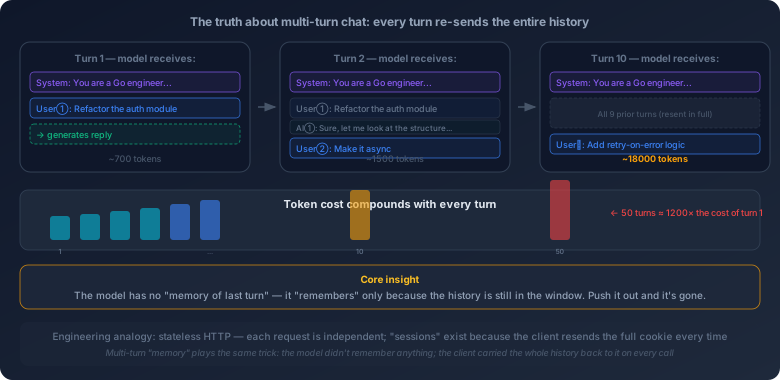
Every turn, the model processes that whole block from scratch. There is no “memory of last turn.” There is no “conversation state.” There is no cross-request persistence whatsoever. There is only this block of text in front of it, right now.
If you’ve written web services, this should feel familiar — it’s stateless HTTP. Each request is independent; the server doesn’t keep session state. The “stateful” experience comes from the client carrying full session info in every request via cookies or session tokens. Multi-turn chat plays exactly the same trick: the model doesn’t remember anything; the client just hands it the full history each time.
This mechanism has a few direct consequences.
Cost compounds. Turn 1, the model processes one message. Turn 10, it processes the full first nine turns plus your new message. Turn 50, it processes the full first forty-nine turns plus your new message. Input tokens go up every turn, and so does the bill. Roughly speaking, a fifty-turn conversation consumes around 1,200 times the tokens of turn 1 — not 50 times, because every turn re-processes everything.
“It remembered” only means “it’s still in the window.” The model looks like it remembered what you said, but only because what you said is still inside the context window. Once the conversation grows past the window’s capacity, the oldest messages get truncated. From that moment on, the model has no idea about the truncated content. Not “vaguely recalls” — genuinely doesn’t know. A key constraint you defined in turn 3 will, by turn 40, behave as if it never existed.
Conversation quality degrades as length grows. Not just because old content gets truncated. Even if everything still fits in the window, attention’s effective resolution drops as text gets longer — middle sections get less focus, early information gets diluted, and the cumulative drift of autoregressive generation compounds. The latter half of a long conversation almost always feels worse than the first half.
This is why experienced AI coding users actively “restart” conversations — not because something broke, but because they understand the mechanism. A clean, well-organized short context almost always beats a long, noise-filled one.
There’s also a smaller detail worth flagging: role labels are just text.
At the API level, multi-turn messages come tagged with roles — system, user, assistant. The labels look like a protocol, but to the model they’re just special markers in the text. The model has been trained to “treat content under user: as user input, and content under assistant: as something it said before.” But again, this is statistical, not rule-based.
Which leads to a curious fact: you can fabricate assistant history in an API call. Drop a fake assistant message into the message list, and the model will treat it as something it said earlier and continue from there. This isn’t a vulnerability. It’s just how it works. The model has no “real memory” to verify whether it actually said that — it can only see what’s in the context.
Few-shot and Chain-of-Thought: Not Magic, but Pattern Matching via Attention
By now you understand the context window, how a System Prompt works, and the truth about multi-turn chat. Let’s now look at two of the most-discussed interaction techniques — few-shot and chain-of-thought — and why they actually work.
First, few-shot.
Suppose you want the AI to convert a JSON blob into a Go struct of a specific shape. You can describe the rules: “field names in CamelCase, json tags in snake_case, time fields as time.Time…” Or you can skip the rules entirely and just give two or three examples:
Input:
{"user_name": "alice", "created_at": "2024-01-01"}Output:type User struct { UserName string `json:"user_name"` CreatedAt time.Time `json:"created_at"` }
Then hand it a new JSON, and ask it to apply the same pattern.
That’s few-shot — show the model a handful of input/output pairs in context and let it follow the pattern.
Why does it work? Not because the model “learned” something new from those examples. The model’s weights don’t change at inference time — it doesn’t become a “more Go-struct-aware” model just because you gave it a few examples. Few-shot is calibration, not teaching.
Back to attention: when generating each token, the model “sees” everything that came before in the context and assigns attention weights to each part. When the context contains several structurally consistent input/output pairs, attention picks up on the pattern — “input is JSON, output is a Go struct, the field name conversion looks like this.” That pattern strongly biases the probability distribution of subsequent tokens, pushing the model to keep replicating it.
The model already “knew” how to turn JSON into Go structs — that knowledge was baked into the weights at training time. But “knowing how” isn’t the same as “doing it the way you want.” CamelCase or snake_case? string or time.Time for timestamps? The model has to read those clues from context. Few-shot examples are exactly those clues — they activate latent capability and steer it in the direction you want.
That’s also why the quality of few-shot examples matters far more than the quantity. Two precise examples that cover the key patterns usually beat ten redundant ones. Attention cares about the pattern, not the count.
Now, chain-of-thought.
Large models don’t “think first, then speak.” They emit tokens one at a time. Each step is a probability prediction conditioned on everything before it.
A direct corollary: the model’s “reasoning” is bounded by what it can compute in a single step. If a problem requires five reasoning steps and you ask the model to jump straight to the answer, it has to implicitly perform all five steps inside one forward pass. That puts heavy demand on the model’s internal computation, and the intermediate steps are invisible — if step three goes wrong, every later step builds on a broken foundation, and you have no way to see where it broke.
Chain-of-thought (CoT) flips this: have the model write down its reasoning steps first, then give the final answer.
This is not a “prompt trick.” It’s exploiting the core property of autoregressive generation. Once the model writes out step 1, that text becomes part of the context. When generating step 2, the model can see not just the original problem, but its own conclusion from step 1. Each reasoning step becomes the input for the next — the model has handed itself a scratchpad.
Implicit reasoning becomes explicit reasoning. A single big jump becomes several small steps. Each link in the chain is shorter, drift accumulates more slowly, and final accuracy goes up.
What do few-shot and chain-of-thought have in common at the deepest level? They both change the model’s output behavior by changing the context. The model itself doesn’t change — its weights don’t move. What changes is the input. The context is the model’s entire world. What you put in there directly determines what comes out.
This idea will keep coming back. Agent System Prompts, MCP tool descriptions, RAG retrieval snippets — they all work the same way: drop specific text into the context, and let attention shape the generation probabilities. Different forms, same essence.
Lost in the Middle: The Longer the Context, the Easier It Is to Ignore the Middle
Now let’s look at a counterintuitive phenomenon that should change how you organize information.
Intuitively, bigger windows should be better. A few thousand isn’t enough? Have tens of thousands. Tens of thousands not enough? Have a million. Stuff all the relevant code, docs and history into the same blob and let the model figure out what’s useful. Sounds reasonable.
But researchers found something uncomfortable: as context grows longer, the model pays the most attention to the beginning and end, and the least attention to the middle. The phenomenon is called “Lost in the Middle.”
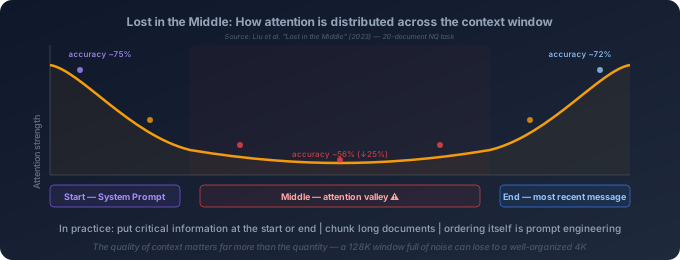
This isn’t a quirk of one specific model. It’s a structural property of attention.
Why does it happen? Recall how attention works: every token computes attention weights over every other token. But those weights are not evenly distributed — positional encoding gives the model different “preferences” for different positions. The very beginning typically holds global instructions and background (the System Prompt lives there), and during training the model learns to weight it more heavily. The very end is the most recent input, closest to the current generation point, and naturally gets the highest attention. The middle — neither global instructions nor recent input — becomes an attention valley.
What does this mean in practice?
Say you’re doing a code review. You drop a 2,000-line file into context and ask the AI to find every security flaw. Issues at the top and bottom of the file are likely to be caught. Issues sitting around lines 800–1200? Often missed. Not because the model isn’t “trying,” but because attention literally focuses less on that region.
Or say you stuff ten reference snippets into context and ask the model to answer based on them. If the most relevant snippet happens to land in the fifth slot (right in the middle), the model may quietly ignore it and lean on a less relevant snippet at the front or the back. You get back an answer that sounds reasonable but is built on the wrong source — and it’s easy to miss, because the model’s tone is just as confident as ever.
This directly shapes how you should organize what you feed into the model:
Put critical information at the top or the bottom. If there’s a key constraint or rule, don’t bury it in the middle of a long context. Put it in the System Prompt (top) or at the end of the user message (bottom).
Chunk long documents instead of dumping them whole. Rather than shoving an entire 2,000-line file into the context, use search or indexing to find the relevant sections first, and only include those. Less but more relevant context almost always beats more but noisier context.
The order of context is itself a kind of prompt engineering. The same information arranged differently can produce very different outputs. This isn’t superstition. It’s a physical property of attention.
Lost in the Middle reveals a deeper truth: context quality matters far more than quantity. A million-token window gives you enormous capacity, but if you fill it indiscriminately, the model’s effective attention may end up worse than with a carefully organized few-thousand-token context. Window size is the ceiling the hardware gives you. Ceiling is not the optimal operating point.
Which leads naturally to the next question: if the window can’t fit everything, can we automatically pull in just the most relevant pieces when we need them?
That’s the basic idea behind RAG (Retrieval-Augmented Generation). Your project has hundreds of thousands of lines — there’s no way it all fits in context. But if you build an index, then when the user asks “how does the auth module work?” the system can retrieve the most relevant code and doc snippets and only inject those. The model now has a focused, high-signal context to work with. Cursor’s codebase indexing, Copilot’s @workspace — they’re all variants of this idea.
RAG is not a standalone technology. It’s an engineering response to the finiteness of the context window: if you can’t put everything in, put the most relevant parts in. The quality of retrieval directly determines the quality of generation — bad retrieval means the model is making probability predictions on the wrong context, and the answer can’t be right. We’ll go into this in more depth in the RAG chapter, but for now the framing is enough: the limit of the context window is not a problem you wait for hardware to solve. It needs an entire context engineering discipline — how to retrieve, how to filter, how to order, how to compress, so that a finite attention budget produces the maximum value.
This principle will keep showing up later, in the chapters about token cost and knowledge injection. How to put the most valuable information into a finite attention budget — that’s one of the core engineering challenges of AI coding.
From Completion to Chat: Paradigm Shifts Are Not Product Choices
Finally, let’s pull back and look at the evolution of how we interact with large models. This isn’t a story about product iteration. It’s a story about how shifts in model capability redraw the boundary of human–machine collaboration.
The Completion Era. The earliest large models did one thing: continue text. You wrote half a sentence, they filled in the rest. You wrote def fibonacci(, and they completed n): return n if n <= 1 else fibonacci(n-1) + fibonacci(n-2). The interaction was extremely primitive — you couldn’t “talk to it” or “instruct it,” only “give it a head and let it carry on.”
That was reasonable for the time. GPT-2 and early GPT-3 had context windows of just 2K–4K tokens — they could see very little. Within that small a window, “continuation” was the most pragmatic interaction style: you provide a small slice of context, and the model predicts within that local span. Copilot’s original line-by-line completion was a product of this era.
The Chat Era. The turning point was RLHF (Reinforcement Learning from Human Feedback). Through RLHF, the model learned a new skill: following instructions. You no longer needed to “give it a head.” You could just say “write me a connection pool,” and it would understand that as an instruction and generate a complete implementation.
This wasn’t a product manager deciding “let’s build a chat UI.” It was a shift in capability — from “can only continue” to “can follow instructions” — that changed the space of possible interactions. Once the model can understand “refactor this code,” conversation becomes a more natural and efficient interaction style than continuation. ChatGPT exploded not because the chat interface was novel, but because the underlying model first acquired the ability to genuinely follow natural language instructions.
On the eve of the Agent Era. The chat paradigm solved “understanding instructions,” but it had a fundamental limit: the model could only “say,” not “do.” You ask it to write code; it writes code. But it can’t run the code, can’t read your project files, can’t search docs, can’t verify whether the output is correct. It’s an assistant with a mouth but no hands.
As context windows kept expanding and Function Calling emerged, this limit started to give. The model is no longer just “answering questions.” It begins to be able to “take on a task” — see the goal, break it into steps, decide which tools to call, execute them, check results, decide the next step. That’s the seed of an Agent, and it deserves its own discussion.
The deeper pattern in this evolution is not “product designers chose the interaction style,” but “shifts in model capability redrew the boundary of human–machine collaboration.” In the Completion era, the model could only predict locally, so the interaction was line completion. In the Chat era, it could follow instructions, so the interaction became dialogue. In the Agent era, it can plan and execute multi-step tasks, so the interaction becomes delegation. None of these transitions came out of nowhere. Each one was the inevitable result of underlying capability crossing a threshold.
You now know how to steer the wheel: the context window is the model’s entire world, the System Prompt is a probabilistic nudge rather than a hard command, multi-turn chat is stateless string concatenation, and attention sags in the middle of long text. None of these are product design choices. They are direct consequences of the underlying mechanism.
Together they form one foundational view: everything that happens between you and a large model is, at heart, information management inside a finite text box. Where you put information, how much you put in, what order you put it in — those decisions directly shape the output. Every concept that comes later — Agent context bloat, the cost of tool descriptions, the progressive disclosure pattern of Skills — is just an extension of this same foundation.
I’ve been pulling these threads further along this same line, and turning my notes into an open-source book: First Principles of AI Programming. If this kind of thinking interests you, you can keep reading here: